Historical configuration example: review the headers below against your current hosting, embedded services and browser requirements before using them. HSTS with includeSubDomains or preload affects more than this page; do not copy those settings without checking every affected hostname. The sample is not a universal WordPress security configuration.
HTTP Security Headers – What are they?
HTTP Security Headers in WordPress refer to various pieces of information transmitted from a server to a user’s browser. These headers play a pivotal role in enhancing web application security by providing directives on how to handle the page and its associated resources.
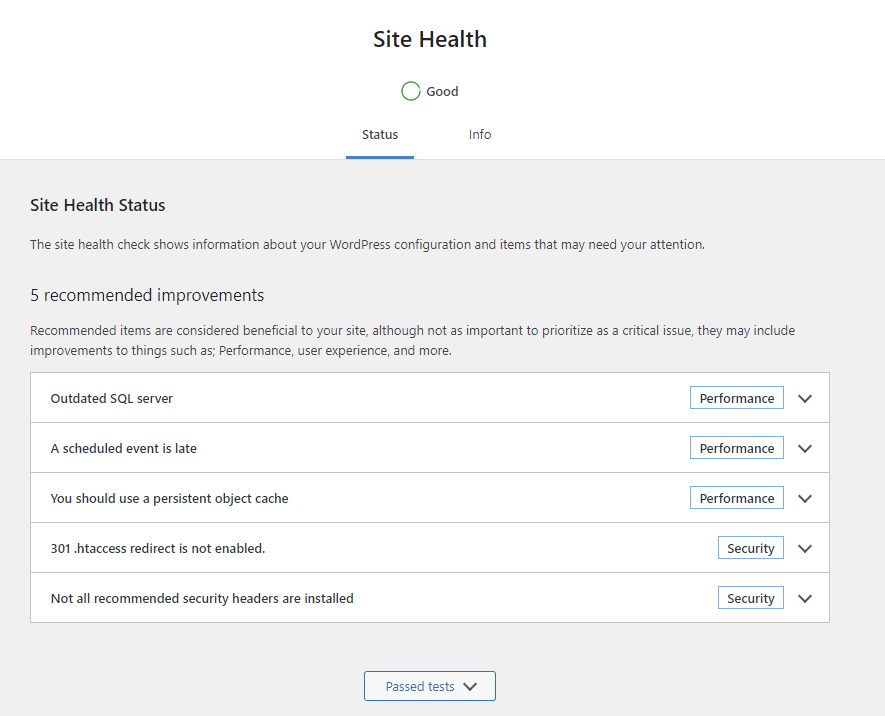
A security plugin or external scanner may report missing response headers. Check which tool produced the warning and whether its recommendations fit your site.
Review each policy against the site’s features and test the result before applying it to production. Headers complement secure application code and maintenance.
Where to configure security headers
- First confirm which server or proxy sets the response headers. For Apache hosting that permits .htaccess overrides, use your host’s File Manager or a secure file-transfer connection. Back up the existing file and keep a way to restore it.
- Locate the site’s document root, which may be named public_html.
- Check that Apache’s mod_headers is enabled and that the host permits the Header directive in .htaccess . Other server configurations need their own instructions.
Historical Apache security-header example:
(Review the existing rules before editing .htaccess):
# Security Headers

Header always set Strict-Transport-Security "max-age=63072000; includeSubDomains; preload" env=HTTPS

Header always set X-Content-Type-Options "nosniff"

Header always set X-XSS-Protection "0"

Header always set Referrer-Policy "strict-origin-when-cross-origin"

Header always set X-Frame-Options "SAMEORIGIN"

Header always set Permissions-Policy "geolocation=(self), microphone=(self), camera=(self)"

# End Security Headers- HSTS – After receiving this header over HTTPS, a supporting browser uses HTTPS for subsequent requests while the policy remains valid. The max-age value sets its lifetime; includeSubDomains extends its scope. Adding preload alone does not register the domain on a browser preload list.
- X-Content-Type-Options – The nosniff value tells browsers to respect the declared content type rather than infer another one. Serve files with the correct MIME type.
- X-XSS-Protection – The value 0 disables the legacy XSS filter in browsers that support it. This deprecated header is not a modern XSS defense; use secure output handling and an appropriate Content Security Policy.
- Referrer-Policy – Controls which referring-page information accompanies requests to another domain or to the same site, including requests for page resources.
- X-Frame-Options – SAMEORIGIN restricts framing to the same origin, helping reduce ‘clickjacking’ attacks. Check any legitimate embedding requirements and the site’s Content Security Policy.
- Permissions-Policy – Allows sites to more tightly restrict which origins can be granted access to browser features.
Choose response headers for the actual application and verify the headers delivered to visitors. A scanner score alone does not establish that a site is secure.
For current guidance, consult OWASP . The following names are a reference list, not a configuration to enable wholesale:
- HTTP Strict Transport Security
- X-Frame-Options
- X-Content-Type-Options
- Content-Security-Policy
- X-Permitted-Cross-Domain-Policies
- Referrer-Policy
- Clear-Site-Data
- Cross-Origin-Embedder-Policy
- Cross-Origin-Opener-Policy
- Cross-Origin-Resource-Policy
- Cache-Control
These headers serve different purposes. Select policies for the application, resources and supported browsers; WordPress version alone does not determine which headers apply. Review the linked guidance before adding or removing one.
Whenever configuring HTTP security headers, be aware of these common avoidable problems:
- An invalid server directive can cause an error response. Test changes and keep the previous configuration available for restoration.
- Overly restrictive policies can block scripts, embeds or browser features. Check sign-in, forms and integrations after a change.
- Need help reviewing the configuration? Contact us. Our Elsen.fi case study describes cookie-consent implementation; security headers alone do not establish legal compliance.